Insight
How We Know Which Bank Your Statement Comes From

Kittisak Ma

And why the list that decides it is written by hand
Every bank prints its statement differently. Wells Fargo puts money in and money out in two separate columns. Citizens Bank prints one column with a minus sign. Barclays prints the money-out column first. So before Docubrew can pull a single transaction out of a PDF, it has to answer one question: which bank printed this?
Two of those layouts, side by side:
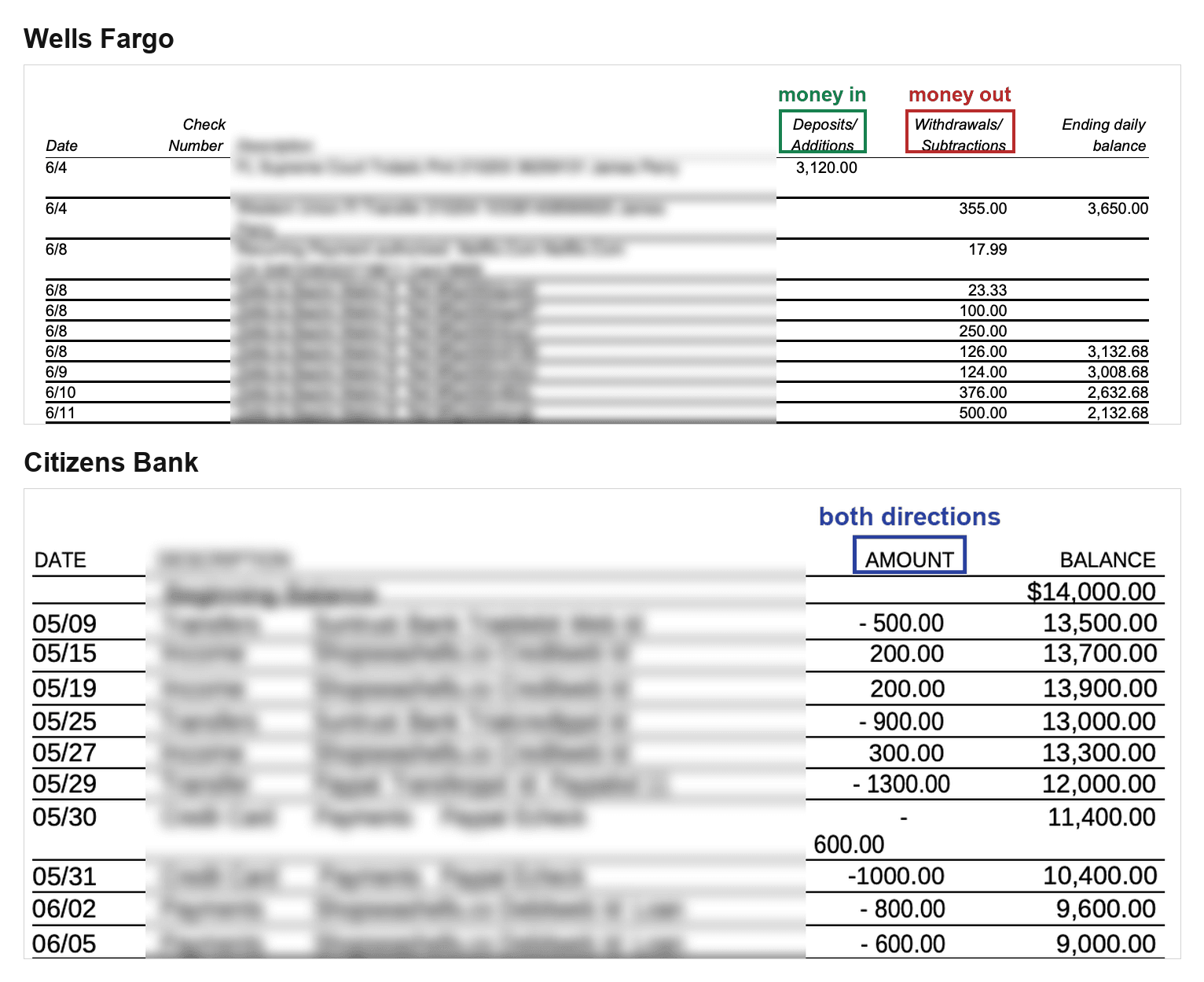
Wells Fargo tells you the direction by which column a number sits in. Citizens tells you with a minus sign in a single column. Nothing else on either page says which is which.
Our parser is rule-based, so the wrong bank means the wrong column: deposits come back as withdrawals, in a CSV that looks perfectly normal.
So this post is about the routing step: how Docubrew picks a parser, what keeps two look-alike banks apart, and what happens when none of the 34 match. You may be wondering is why any of this is hand-written when a model would read the statement without it.
The whole decision is one loop
There are 34 bank parsers in convert_pdf_core today, plus a catch-all. They sit in a Python list, in a fixed order, and this loop in router.py walks it:
page_texts holds the text of the first three pages (_MAX_DETECT_PAGES = 3). We look past page one because plenty of statements open with a cover page or a marketing insert, and the bank's name only shows up after it.
That is the entire method. Go down the list, ask each parser "is this yours?", and the first one that says yes gets the file. No scoring, no ranking, no tie-break. Thirty-five checks against three pages of text is too fast to measure. If that list ever reaches 300, it will be slow enough to care about, and I will deal with it then.
The list itself is exactly what it sounds like:
Adding a bank means editing that list and opening a pull request. Someone reads it. That is the point.
Two banks, one name
A parser says "this is mine" by looking for words on the page. Bank statements are printed documents with stable branding, so the words are reliable, and a list of words is something a person can check. A trained model is not.
The catch is that the words overlap. Here is the Citizens Bank check, cut down to the part that matters:
Now look at what a First Citizens Bank statement puts on page one.
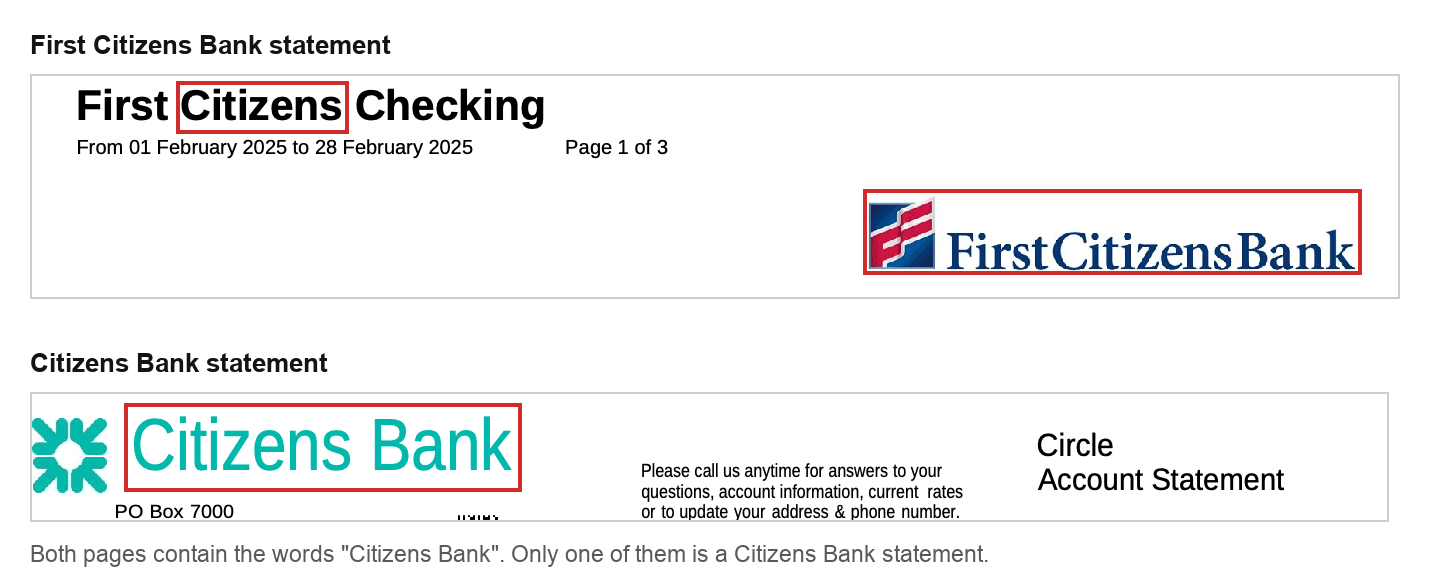
"First Citizens Bank" contains "Citizens Bank". The check above has no idea those are two different banks. On the First Citizens statements in my test files, it survives on a technicality. They hit only one word from the list, and the rule needs two. Any First Citizens statement that also printed "Member FDIC", which most US statements do somewhere, would hit two and get claimed by the wrong parser.
And these two banks lay out their tables nothing alike.

First Citizens splits money into Deposits/Additions and Withdrawals/Subtractions. Citizens prints a single Amount column where the minus sign carries the direction. A parser built for one, pointed at the other, does not crash. It reads the columns it expects to find, in the positions it expects them, and writes out numbers.
One line of ordering was all that stood between me and that. FirstCitizensParser() sits above CitizensBankParser(), so it gets asked first, and it says yes.
That is a guarantee about position, not about meaning, and writing this post is what pushed me to fix it properly. The obvious patch is to add "FIRST CITIZENS" to the exclude list, and it is wrong: a real Citizens statement with a line like TRANSFER TO FIRST CITIZENS BANK would then reject its own parser. The fix that holds is to ask the other detector, which needs the anchor "FIRST CITIZENS" plus two of nine supporting phrases and so cannot be fooled by a payee name:
The order still stands. It is just no longer the only thing standing.
The same pattern shows up all over the list. The 2025 TD layout is checked before the 2024 one, because the newer check is stricter and the older one is loose. Bank of America credit cards are checked before Bank of America checking, because a credit card statement is also a Bank of America statement, and only one of those parsers knows what a minimum payment is.
The time I let code choose the order
I wrote register_parser() so a parser could be added without editing the file. My first version took a before argument, and when it could not find the parser you named, it quietly stuck yours on the end of the list instead.
The last entry in the list is the catch-all, and the catch-all says yes to every PDF. So "on the end" means "never".
Nothing failed. No error, no warning. The new parser was correct, its own tests passed, and it never ran once on a real file. The fix was to stop being quiet:
That bug is the entire argument against letting the software build the list for itself, and I am the one who wrote it. Plugin systems that scan for installed parsers hand you an order that depends on what got installed, in what sequence, on which machine. When the order is the rule, an order nobody chose is an answer nobody can predict. A list in a file shows up in a diff, and a reviewer can see that your new parser landed under the catch-all.
When we do not know the bank
GenericFallbackParser is last parser in the order. If your bank is not one of the 34, it looks for ruled tables first, and if there are none, it scans the page for date-shaped text with amount-shaped text nearby. In most cases, this works well. But since it does not know your bank's layout, it can sometimes get things wrong. To show you what that looks like, we took a Wells Fargo statement and ran it through the fallback parser and its own parser.
Here is the table we are about to hand it, five rows off page 2 of a Wells Fargo statement.

Read by the Wells Fargo parser:
And the same five rows of the same PDF, read by the catch-all:
It found the right rows, but only the two deposits were classified correctly. All three withdrawals were treated as deposits.
The reason is simple: this statement uses columns, not minus signs, to tell deposits from withdrawals. The fallback parser does not understand those column headers. It only sees the amount, so a negative number becomes a Withdrawal, while everything else becomes a Deposit. Even a row with “Withdrawal” in its description can therefore be classified as a deposit.
Just to let you know, behind every parsed row, we also keep a confidence score based on how much evidence supports the result. For statements we do not recognize, the fallback parser intentionally keeps this confidence lower. This does not mean the result is wrong, we are simply being cautious. The score stays internal to avoid confusing users and it also helps us see which bank need their own parser next.
Currently, we are exploring a more practical solution: letting you mark the transaction area, columns, and headers directly in the PDF viewer. This could turn an unrecognized statement into a format you define clearly.
Until then, if a statement does not convert correctly, use the Report feature in the app and we will convert it for you for free.
Why not point a model at it
The obvious question is why I wrote 34 hand-written parsers at all, when an AI model would read any statement without a single one of them. Two reasons: I need the same PDF to produce the same CSV every time, down to the byte, and I need a missing amount to stay blank rather than be guessed at. A model gives me neither, and we mentioned about this topic in ChatGPT vs a bank statement converter.
That is not a permanent no. I'm currently exploring different methods at recognizing a bank nobody has written a specific parser for with privacy in mind. I'll share more details once it's more clear. Stay tuned!